Cross-platform Trojan that infects Windows, Mac and Linux machines via Java. Interestingly enough, the Trojan is not persistent in Linux as it cannot survive reboots.
A breakdown of the infection rate by OS can be found here.

Kernel patching
 Upgrading to a new kernel version is necessary from a security perspective but it inevitably introduces a new entry in Grub. You can remove those redundant entries by:
- Launching "Synaptic Package Manager".
- Searching for "Linux kernel image".
- Check "Mark for complete removal" for the kernel versions you no longer need.
- Click "Apply".
Secure your cookies
 In light of the publicity created by Firesheep, HTTPS Everywhere has been updated to force websites to activate a secure flag in cookies used to authenticate their users.
I finally tested Firesheep. It is painfully easy to use for hijacking sessions. Here I start Firesheep on a Windows machine (via RDP) and I log into Facebook on a Ubuntu system. As seen in the screenshot, Firesheep quickly captures the cookie of that session and permits easy access to the active account.
Blacksheep
Firesheep
Session hijacking is nothing new with early tools such as Ferret supporting this attack. This Firefox extension, Firesheep, has simplied the attack.
I can't wait for the Linux version to be released so that I can play with it. Ways of avoiding becoming a victim of session hijacking are:
I can't wait for the Linux version to be released so that I can play with it. Ways of avoiding becoming a victim of session hijacking are:
- Using encrypted wireless networks.
- Using a VPN tunnel over insecure wireless networks.
- Use full HTTPS sessions. HTTPS Everywhere is one tool that automates the use of HTTPS for popular websites like Facebook.
- Be wary of links sent via email or instant messaging.
Bruteforcing analysed
The concept behind the article "Learning from bruteforcers" in issue 27 of (IN)SECURE Magazine is simple but I appreciate the author’s thorough analysis and trending.
Easily one of the most interesting articles that I have read in a long time.
Easily one of the most interesting articles that I have read in a long time.
"Prey: A new hope"
A combination of inspiration from reading about the tool, Prey, and an email from Hakin9 mag's editor prompted me to write a new article.
An excerpt from my new article.
"Misplaced your laptop or had it stolen? You are not alone. Dell and the
Ponemon Institute collaborated on a study with 106 United States airports
as well as over 800 business travelers to ascertain the frequency with which
laptops are lost in airports."
An excerpt from my new article.
"Misplaced your laptop or had it stolen? You are not alone. Dell and the
Ponemon Institute collaborated on a study with 106 United States airports
as well as over 800 business travelers to ascertain the frequency with which
laptops are lost in airports."
Prey
 Ever worried about your laptop getting lost? There's a software called "Prey" that can ease your fears. It is a utility that lets you know where your laptop is and can be installed on Windows, Linux and Mac OS X.
It is easy to setup. Register with the Prey website then enter the API and device key information into the configuration window to start the agent.
XSS and SQL injection
These attacks are not new but yet are still very effective against web applications. Here is an article that discusses how to test for such vulnerabilities and how to mitigate them.
Tabnabbing
HTTPS Everywhere
Most websites support HTTPS but do not switch users to the more secure protocol when they visit their sites. The EFF and Tor project have collaborated to release a Firefox addon to automatically redirect users' sessions to HTTPS.
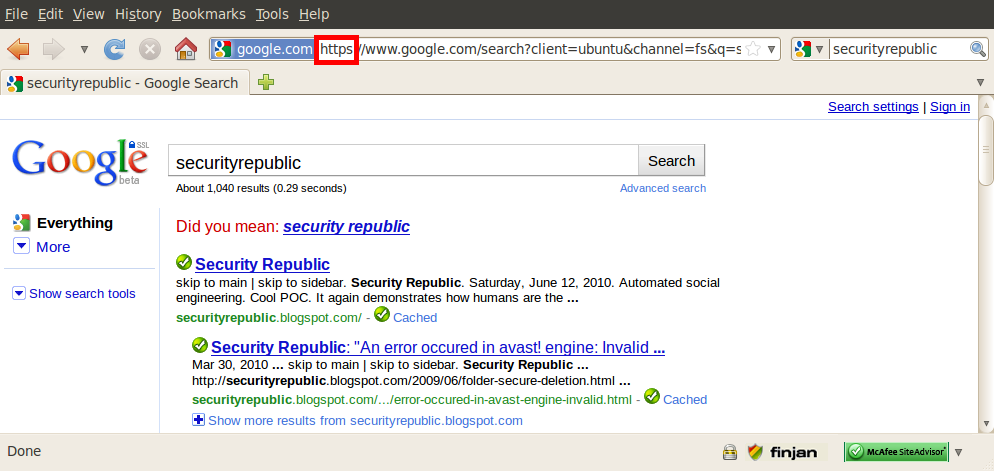
Here I demonstrate a Google search prior to installing the plug-in. My search is trasmitted over the Internet in cleartext. After installing the tool, my Google search is automatically secured over HTTPS. The tool has a default list of websites supported but offers the flexibility of adding your own URLs to be managed by it.


Here I demonstrate a Google search prior to installing the plug-in. My search is trasmitted over the Internet in cleartext. After installing the tool, my Google search is automatically secured over HTTPS. The tool has a default list of websites supported but offers the flexibility of adding your own URLs to be managed by it.



Subscribe to:
Posts (Atom)
-
This annoying message popped up after I ran the update in avast! in Ubuntu yesterday. avast! crashes every time I attempt to launch it after...
-
 I decided to install a digital certificate for my Gmail account. This is simple and free to set up. Apply for a free certificate from Comod...