Wrote a simple script for keeping packages and snaps updated in Ubuntu.
Showing posts with label Hack. Show all posts
Showing posts with label Hack. Show all posts

"onion-scraper"
Not the most creative of tool names but literal. Had a need to download evidences of data leaks from Ransomware blog posts so harnessed "Copilot" again to create said script to get work done.
dnssecaudit.py
Since I was on a roll with Copilot, I decided to automate DNSSEC auditing with the following Python script. Not the most creative tool name.
Modded script to keep Ubuntu packages and snaps updated.
Used Copilot to update my Ubuntu maintenance script. I did tweak it slightly though since I am running LTS and don't want all packages to be updated to the latest version.
#!/bin/bash
# Function to handle errors
function handle_error {
echo "$1 Exiting."
exit 1
}
# Function to update apt packages
function update_apt {
echo "Updating apt package lists..."
sudo apt update || handle_error "Error updating apt package lists."
echo "Upgrading apt packages..."
sudo apt upgrade -y || handle_error "Error upgrading apt packages."
echo "Cleaning up apt packages..."
sudo apt autoremove -y && sudo apt clean || handle_error "Error cleaning up apt packages."
}
# Function to update snap packages
function refresh_snaps {
echo "Updating Snap packages..."
sudo snap refresh
if [[ $? -ne 0 ]]; then
echo "Refresh failed. Attempting to kill running Snap processes..."
sudo pkill -f snap
sudo snap refresh || handle_error "Error updating Snap packages after killing processes."
else
echo "Snap packages updated successfully."
fi
}
# Function to update Maldet database and run a scan
function run_maldet {
echo "Updating Maldet database..."
sudo maldet -u || handle_error "Error updating Maldet database."
echo "Starting Maldet scan of /home (recent changes, quiet mode)..."
sudo maldet -r -q /home || handle_error "Error running Maldet scan."
SCAN_LOG=$(sudo maldet --report list | tail -n 1 | awk '{print $NF}')
if [[ -n "$SCAN_LOG" ]]; then
echo "Maldet scan log located at: $SCAN_LOG"
else
echo "Could not retrieve Maldet scan log location."
fi
}
# Main script execution
update_apt
refresh_snaps
run_maldet
echo "All done!"
Autobots.py
Had an epiphany to try writing a working "Python" script using "Copilot". I call the following script "Autobots" to help audit the presence of "robots.txt".
VMware Workstation Pro is now free for personal use!!!
VMware Workstation Pro is now free for personal use!!! However, it was not straight forward to install on Ubuntu as I encountered error messages when attempting installation.
After spending a few hours scouring the Internet for answers and troubleshooting, I found the answer and decided to document the steps.
1. Install "make" and "gcc" on Ubuntu.
2. Install VMware Workstation Pro (for personal use) using the bundle downloaded from Broadcom's website.
3. Run the following script to overcome the issue of not being able to build VMware modules due to Ubuntu Kernel version incompatibility.
#!/bin/bash
git clone https://github.com/mkubecek/vmware-host-modules
cd vmware-host-modules
git checkout workstation-17.5.0
sudo make ; sudo make install
Viola! VMware Workstation Pro 17.5.2 should work now. Do note that the version listed above was through trial and error.
Brute force
Been awhile since I've performed a brute force attack. In this demo, I use "Hydra" from "Kali" to attack my test "Virtual Machine" (VM) running "File Transfer Protocol" (FTP).
Simple session hijacking demo
Been a long time since I've had to demo "session hijacking". Picked DVWA as the vulnerable web application to demonstrate "cookie theft" and "session hijacking" using "Burp".
Scenario: A man-in-the-middle (MiTM) scenario is where a "Hacker" positions themselves between a client and server. In a successful MiTM situation, the "Hacker" can use a "web proxy" like "Burp" to intercept traffic between a victim and web application. The "Hacker" is able to capture the victim's post-authentication cookie to impersonate the authenticated victim.
Simple file carving demo
Been awhile since I've done hands on "file carving". I was pleasantly surprised that it is so much easier now to "carve" files from "Wireshark".
Scenario: A "Hacker" is at an open Wi-Fi operated by a Cafe. The "Hacker" uses "Wireshark" to capture network traffic traversing the wireless network. One user transfers an "Excel Spreadsheet" containing personal data onto an FTP server. The "Hacker" is able to successfully "carve" the transferred file from the network packets captured.
DNS security on Android

Whilst my go-to DNS on "Desktops" is "OpenDNS" but it is not compatible with the "Private DNS Mode" in "Android".
I am using the DNS offering from "Cloudflare" instead. "Google" is an option but do note that you will be surrendering even more information about your traffic to them.
Easily access the section by searching DNS in "Android" then entering the DNS service's hostname that you want to use into the "Private DNS provider hostname" field.Bash on Windows
The day has finally arrived where I can run Linux commands on Windows. This is way better with the ability to run comands like "grep".
 Set up Bash on Windows and you are ready to go.

Windows Nessus batch job
Wrote a simple Nessus batch job to get the updates.
cd \
cd "Program Files"/Tenable/Nessus/
net stop "Tenable Nessus"
nessuscli update --all
net start "Tenable Nessus"
#Written by commandrine.
#Last updated on 15 Feb 2017.
cd \
cd "Program Files"/Tenable/Nessus/
net stop "Tenable Nessus"
nessuscli update --all
net start "Tenable Nessus"
#Written by commandrine.
#Last updated on 15 Feb 2017.
sslyze
There are automated ways of checking webservers that support HTTPS if they are configured securely.
sslyze is a personal favourite of mine. They initially only supported Unix/Linux systems but have now ported it over to Windows as well.
Below is a sample of the command to run to start testing.
./sslyze.py --regular www.xyz.com:443
sslyze is a personal favourite of mine. They initially only supported Unix/Linux systems but have now ported it over to Windows as well.
Below is a sample of the command to run to start testing.
./sslyze.py --regular www.xyz.com:443
Bluetooth
For some strange reason, Bluetooth is always persistently enabled on Ubuntu when you boot up even if you had turned it off in a previous session.
 Easy solution is to add the highlighted line to the /etc/rc.local file.

Browser security updated
It has been awhile since I have updated this "Blog" and decided to start by refreshing my list of recommended "Firefox" security addons.
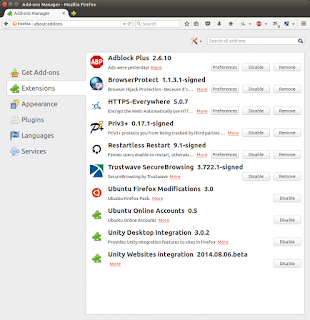

Browser security
I was asked by a friend to recommend a list of tools to protect his browser and secure his surfing experience.
A picture speaks a thousand words.
A picture speaks a thousand words.

Insecure passwords
Was in the middle of a "Penetration Testing" exercise and came across an application that sends the users' credentials in cleartext. I was surprised as I rarely encounter this scenario.
This got me thinking if popular apps such as "Facebook" and "Gmail" send our credentials in cleartext too? Fired up "Paros" and the rest they say is history.


This got me thinking if popular apps such as "Facebook" and "Gmail" send our credentials in cleartext too? Fired up "Paros" and the rest they say is history.
"Tamper Data"
My latest column explores the "Firefox" addon called "Tamper Data". Here is the excerpt.
"HTTP Proxies are a necessary tool in the arsenal of a penetration tester. Common HTTP Proxies harnessed for testing web applications for vulnerabilities include Paros, Burp and Webscarab. My personal favourite is Paros, which is written in Java and thus, platform independent. However, I recently discovered a comparable tool called Tamper Data."
"HTTP Proxies are a necessary tool in the arsenal of a penetration tester. Common HTTP Proxies harnessed for testing web applications for vulnerabilities include Paros, Burp and Webscarab. My personal favourite is Paros, which is written in Java and thus, platform independent. However, I recently discovered a comparable tool called Tamper Data."
"jhead"
My latest column explores a tool called "jhead". Here is the excerpt.
"Smartphones are feature packed and owned by nearly everyone in developed countries. We cannot get by with our daily lifes without them. They provide us with a pocket sized gadget to surf the World Wide Web, direct us to where we want to go via the built-in Global Positioning System (GPS)and even permit us to take videos as well as photographs on the go. The caveat of this device is that it records a lot of sensitive data about its owner by default."
"Smartphones are feature packed and owned by nearly everyone in developed countries. We cannot get by with our daily lifes without them. They provide us with a pocket sized gadget to surf the World Wide Web, direct us to where we want to go via the built-in Global Positioning System (GPS)and even permit us to take videos as well as photographs on the go. The caveat of this device is that it records a lot of sensitive data about its owner by default."
"WebHTTrack"
My latest column on the "Linux" version of "HTTrack". Here is the excerpt.
"HTTrack Website Copier is aopen source tool to download an entire website from the Internet locally onto your desktop for offline browsing. It is a Windowssoftware that spawned WebHTTrack, its Linux/Unix/BSDrelease. The tool dumps and mirrors the complete contents of the source website you specify to a local directory by replicating the exact directory structure, files and links.
This is beneficial for a security practitioner who wants to perform offline security testing against a website without impacting the server hosting it ."
The latest issue of "Hakin9" also features an article by my friend, Remus Ho.
"HTTrack Website Copier is aopen source tool to download an entire website from the Internet locally onto your desktop for offline browsing. It is a Windowssoftware that spawned WebHTTrack, its Linux/Unix/BSDrelease. The tool dumps and mirrors the complete contents of the source website you specify to a local directory by replicating the exact directory structure, files and links.
This is beneficial for a security practitioner who wants to perform offline security testing against a website without impacting the server hosting it ."
The latest issue of "Hakin9" also features an article by my friend, Remus Ho.
Subscribe to:
Posts (Atom)
-
This annoying message popped up after I ran the update in avast! in Ubuntu yesterday. avast! crashes every time I attempt to launch it after...
-
 I decided to install a digital certificate for my Gmail account. This is simple and free to set up. Apply for a free certificate from Comod...