Showing posts with label Encryption. Show all posts

Simple session hijacking demo

Been a long time since I've had to demo "session hijacking". Picked DVWA as the vulnerable web application to demonstrate "cookie theft" and "session hijacking" using "Burp".

Scenario: A man-in-the-middle (MiTM) scenario is where a "Hacker" positions themselves between a client and server. In a successful MiTM situation, the "Hacker" can use a "web proxy" like "Burp" to intercept traffic between a victim and web application. The "Hacker" is able to capture the victim's post-authentication cookie to impersonate the authenticated victim.


Simple file carving demo

 Been awhile since I've done hands on "file carving". I was pleasantly surprised that it is so much easier now to "carve" files from "Wireshark". 

Scenario: A "Hacker" is at an open Wi-Fi operated by a Cafe. The "Hacker" uses "Wireshark" to capture network traffic traversing the wireless network. One user transfers an "Excel Spreadsheet" containing personal data onto an FTP server. The "Hacker" is able to successfully "carve" the transferred file from the network packets captured.


DoH update

 Support for DNS over HTTPS (DoH) in browsers has improved since I last researched it.

In "Brave", it is just a simple click to enable it.


For other browsers like "Firefox", you can refer to this link to enable DoH using "OpenDNS".

However, the "OpenDNS" option fails for some sites so I switched to "Cloudflare" instead.

Batch DNSSEC check

 Wrote a simple Shell script that can check if a list of URLs have DNSSEC enabled.


#!/bin/bash
## Set variables ##
_now=$(date +"%m_%d_%Y")

## Curl Sidn Labs API ##
while IFS= read -r line; do
    curl http://portfolio.sidnlabs.nl/check/$line >> "dnsseccheck_$_now.txt"
done < dnstargets.txt
cat "dnsseccheck_$_now.txt"


##Please edit "dnstargets.txt" in current folder.
##Results will be stored in current folder.
##Written by commandrine.
##Last updated on 6 Apr 2021.

"DNS over HTTPS"

I've always liked "Firefox" but been using "Chrome" and "Brave" more in recent times. I may just go back to "Firefox" with their latest feature "DNS over HTTPS".
You can enable it from "Network Settings".

DNSSEC check

Was recently triggered to research how to verify if a domain has DNSSEC enabled.
The manual way would be to run a "dig" command to query the domain you want to check but the DNS server you query has to support DNSSEC.
Plan B was using an API provided by SIDN Labs. You can leverage their API by running a "curl" command as seen below. Any status other than "secure" is bad.
This method is tedious if you want to check multiple domains. Alternatively, you can populate a CSV file with the domains you want to check and upload them to SIDN Labs using this form. I replicated the form below.

DNSSEC check form

Upload the CSV containing the domains you want to test using SIDN Lab's API.

sslyze batch

I have always been about efficiency and decided to script my "sslyze" scans. Simple batch file below.

@echo off
setlocal ENABLEDELAYEDEXPANSION

set today=!date:/=-!
set now=!time::=-!

@echo SSLYZE scanning in progress... please be patient...
@echo off
cd \sslyze1-0-0
sslyze.exe --regular --targets_in=targets.txt > sslyze-!today!_!now!.txt

start "" "sslyze-!today!_!now!.txt"

#Please edit "targets.txt" in SSLYZE folder.
#Results will be stored in SSLYZE folder.
#Written by commandrine.
#Last updated on 15 Feb 2017.


Remember to create a file "targets.txt" in your sslyze folder and populate it with the hostnames/IPs you want to test.

sslyze

There are automated ways of checking webservers that support HTTPS if they are configured securely.
sslyze is a personal favourite of mine. They initially only supported Unix/Linux systems but have now ported it over to Windows as well.

Below is a sample of the command to run to start testing.

./sslyze.py --regular www.xyz.com:443

Browser security updated

It has been awhile since I have updated this "Blog" and decided to start by refreshing my list of recommended "Firefox" security addons.

Browser security

I was asked by a friend to recommend a list of tools to protect his browser and secure his surfing experience.
A picture speaks a thousand words.

Insecure passwords

Was in the middle of a "Penetration Testing" exercise and came across an application that sends the users' credentials in cleartext. I was surprised as I rarely encounter this scenario.
This got me thinking if popular apps such as "Facebook" and "Gmail" send our credentials in cleartext too? Fired up "Paros" and the rest they say is history.


"Windows Update" compromised

A lot of news recently about "Flame" and one method that the malware used to spread itself was via "Windows Update". Fascinating read.

"HTTPS Everywhere"

Finished this column months ahead of schedule and it was finally published in this month's issue of "Hakin9".
An excerpt of it below.
"HTTPS Everywhere is a Firefox extension that was developed and is maintained by the Electronic Frontier Foundation (EFF). It was first released in June 2010 and is not available from Mozilla but can be downloaded from EFF’s site (https://www.eff.org/files/https-everywhere-latest.xpi)."
I should really get started on my next column draft.

Ubuntu update error

When I ran "sudo-apt update" command in Terminal, I get the following error.

commandrine@bridge:~$ sudo apt-get update
[sudo] password for commandrine:
Hit http://sg.archive.ubuntu.com lucid Release.gpg
Ign http://sg.archive.ubuntu.com/ubuntu/ lucid/main Translation-en_SG
Ign http://sg.archive.ubuntu.com/ubuntu/ lucid/restricted Translation-en_SG
Ign http://sg.archive.ubuntu.com/ubuntu/ lucid/universe Translation-en_SG
Ign http://sg.archive.ubuntu.com/ubuntu/ lucid/multiverse Translation-en_SG
Hit http://sg.archive.ubuntu.com lucid-updates Release.gpg
Ign http://sg.archive.ubuntu.com/ubuntu/ lucid-updates/main Translation-en_SG
Ign http://sg.archive.ubuntu.com/ubuntu/ lucid-updates/restricted Translation-en_SG
Ign http://sg.archive.ubuntu.com/ubuntu/ lucid-updates/universe Translation-en_SG
Ign http://sg.archive.ubuntu.com/ubuntu/ lucid-updates/multiverse Translation-en_SG
Hit http://sg.archive.ubuntu.com lucid Release
Hit http://sg.archive.ubuntu.com lucid-updates Release
Hit http://sg.archive.ubuntu.com lucid/main Packages
Hit http://sg.archive.ubuntu.com lucid/restricted Packages
Hit http://sg.archive.ubuntu.com lucid/main Sources
Hit http://sg.archive.ubuntu.com lucid/restricted Sources
Hit http://sg.archive.ubuntu.com lucid/universe Packages
Hit http://sg.archive.ubuntu.com lucid/universe Sources
Hit http://sg.archive.ubuntu.com lucid/multiverse Packages
Hit http://sg.archive.ubuntu.com lucid/multiverse Sources
Hit http://sg.archive.ubuntu.com lucid-updates/main Packages
Hit http://sg.archive.ubuntu.com lucid-updates/restricted Packages
Hit http://sg.archive.ubuntu.com lucid-updates/main Sources
Hit http://sg.archive.ubuntu.com lucid-updates/restricted Sources
Hit http://sg.archive.ubuntu.com lucid-updates/universe Packages
Hit http://sg.archive.ubuntu.com lucid-updates/universe Sources
Hit http://sg.archive.ubuntu.com lucid-updates/multiverse Packages
Hit http://sg.archive.ubuntu.com lucid-updates/multiverse Sources
Hit http://ppa.launchpad.net lucid Release.gpg
Hit http://security.ubuntu.com lucid-security Release.gpg
Ign http://ppa.launchpad.net/docky-core/ppa/ubuntu/ lucid/main Translation-en_SG
Ign http://security.ubuntu.com/ubuntu/ lucid-security/main Translation-en_SG
Hit http://ppa.launchpad.net lucid Release.gpg
Ign http://security.ubuntu.com/ubuntu/ lucid-security/restricted Translation-en_SG
Ign http://ppa.launchpad.net/docky-core/stable/ubuntu/ lucid/main Translation-en_SG
Ign http://security.ubuntu.com/ubuntu/ lucid-security/universe Translation-en_SG
Get:1 http://ppa.launchpad.net lucid Release.gpg [316B]
Ign http://ppa.launchpad.net/moonlight-team/pinta/ubuntu/ lucid/main Translation-en_SG
Ign http://security.ubuntu.com/ubuntu/ lucid-security/multiverse Translation-en_SG
Get:2 http://ppa.launchpad.net lucid Release.gpg [316B]
Get:3 http://security.ubuntu.com lucid-security Release [44.7kB]
Ign http://ppa.launchpad.net/mozillateam/firefox-stable/ubuntu/ lucid/main Translation-en_SG
Hit http://ppa.launchpad.net lucid Release.gpg
Ign http://ppa.launchpad.net/pidgin-developers/ppa/ubuntu/ lucid/main Translation-en_SG
Hit http://security.ubuntu.com lucid-security/main Packages
Get:4 http://ppa.launchpad.net lucid Release.gpg [316B]
Ign http://ppa.launchpad.net/ubuntu-mozilla-security/ppa/ubuntu/ lucid/main Translation-en_SG
Hit http://security.ubuntu.com lucid-security/restricted Packages
Hit http://ppa.launchpad.net lucid Release
Hit http://security.ubuntu.com lucid-security/main Sources
Get:5 http://security.ubuntu.com lucid-security/restricted Sources [14B]
Hit http://ppa.launchpad.net lucid Release
Hit http://security.ubuntu.com lucid-security/universe Packages
Get:6 http://ppa.launchpad.net lucid Release [57.3kB]
Ign http://ppa.launchpad.net lucid Release
Get:7 http://ppa.launchpad.net lucid Release [14.0kB]
Ign http://ppa.launchpad.net lucid Release
Hit http://security.ubuntu.com lucid-security/universe Sources
Get:8 http://ppa.launchpad.net lucid Release [14.0kB]
Hit http://security.ubuntu.com lucid-security/multiverse Packages
Hit http://security.ubuntu.com lucid-security/multiverse Sources
Get:9 http://ppa.launchpad.net lucid Release [14.0kB]
Ign http://ppa.launchpad.net lucid Release
Hit http://ppa.launchpad.net lucid/main Packages
Get:10 http://ppa.launchpad.net lucid/main Packages [1,506B]
Get:11 http://ppa.launchpad.net lucid/main Packages [752B]
Hit http://ppa.launchpad.net lucid/main Packages
Ign http://ppa.launchpad.net lucid/main Sources
Hit http://ppa.launchpad.net lucid/main Packages
Ign http://ppa.launchpad.net lucid/main Sources
Err http://ppa.launchpad.net lucid/main Sources
416 Requested Range Not Satisfiable 20003
Fetched 61.8kB in 22s (2,794B/s)
W: GPG error: http://ppa.launchpad.net lucid Release: The following signatures couldn't be verified because the public key is not available: NO_PUBKEY 3AD52A40B98E84D3
W: GPG error: http://ppa.launchpad.net lucid Release: The following signatures couldn't be verified because the public key is not available: NO_PUBKEY 9BDB3D89CE49EC21
W: GPG error: http://ppa.launchpad.net lucid Release: The following signatures couldn't be verified because the public key is not available: NO_PUBKEY A6DCF7707EBC211F
W: Failed to fetch http://ppa.launchpad.net/pidgin-developers/ppa/ubuntu/dists/lucid/main/source/Sources.gz 416 Requested Range Not Satisfiable 20003

E: Some index files failed to download, they have been ignored, or old ones used instead.

Turning to the Ubuntu Forum, I get advise on running the following commands to rectify the missing keys issue.

gpg --keyserver keyserver.ubuntu.com --recv 3AD52A40B98E84D3

gpg --export --armor 3AD52A40B98E84D3 | sudo apt-key add -

gpg --keyserver keyserver.ubuntu.com --recv 9BDB3D89CE49EC21

gpg --export --armor 9BDB3D89CE49EC21 | sudo apt-key add -

gpg --keyserver keyserver.ubuntu.com --recv A6DCF7707EBC211F

gpg --export --armor A6DCF7707EBC211F | sudo apt-key add -

I encountered 2 keys that still generate update errors. Heading back to the Forum, I get the following steps to rectify the issue.

sudo -i

apt-get clean

cd /var/lib/apt

mv lists lists.old

mkdir -p lists/partial

apt-get clean

apt-get update

Problem solved.

Encrypted mails

I decided to install a digital certificate for my Gmail account. This is simple and free to set up.
  1. Apply for a free certificate from Comodo.
  2. The certificate will be automatically installed to your browser when you click on the link in the email from Comodo.
  3. Install the "Gmail S/MIME" addon from the Firefox addon source.
  4. Log into Gmail and the "Encrypt" icon is visible when you compose new mails.
You need to allow outbound TCP traffic on port 465 if you have a host firewall running on your system. If you want to export the installed certificate for use in other software, click on "Preferences">"Advanced">"Encryption">"View Certificates".

New 2FA

"PassWindow" is a new type of 2 factor authentication (2FA) in the market. The concept is different from what we are normally used to.

It is compact compared to "RSA" tokens. On the topic of "RSA", "RSA" was breached recently and sensitive data was stolen from their network.

Secure your cookies

In light of the publicity created by Firesheep, HTTPS Everywhere has been updated to force websites to activate a secure flag in cookies used to authenticate their users.
I finally tested Firesheep. It is painfully easy to use for hijacking sessions. Here I start Firesheep on a Windows machine (via RDP) and I log into Facebook on a Ubuntu system. As seen in the screenshot, Firesheep quickly captures the cookie of that session and permits easy access to the active account.

Firesheep

Session hijacking is nothing new with early tools such as Ferret supporting this attack. This Firefox extension, Firesheep, has simplied the attack.
I can't wait for the Linux version to be released so that I can play with it. Ways of avoiding becoming a victim of session hijacking are:
  1. Using encrypted wireless networks.
  2. Using a VPN tunnel over insecure wireless networks.
  3. Use full HTTPS sessions. HTTPS Everywhere is one tool that automates the use of HTTPS for popular websites like Facebook.
  4. Be wary of links sent via email or instant messaging.

HTTPS Everywhere

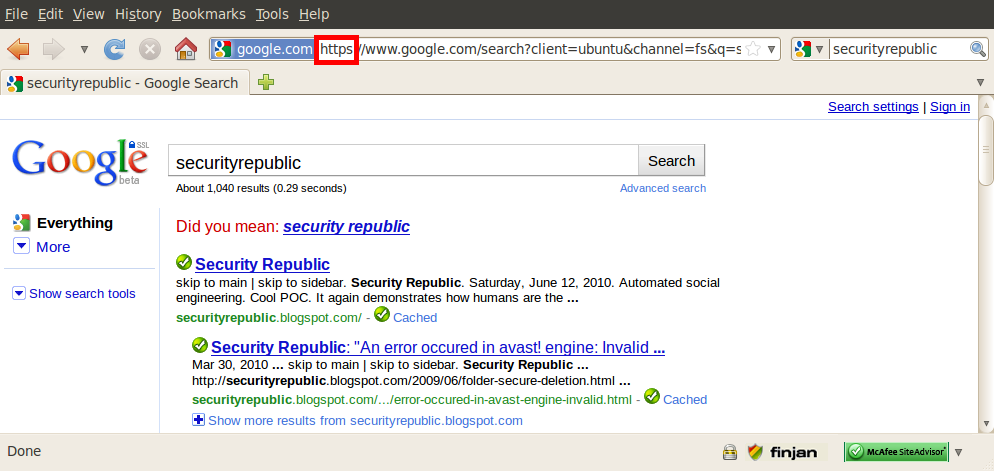
Most websites support HTTPS but do not switch users to the more secure protocol when they visit their sites. The EFF and Tor project have collaborated to release a Firefox addon to automatically redirect users' sessions to HTTPS.
Here I demonstrate a Google search prior to installing the plug-in. My search is trasmitted over the Internet in cleartext. After installing the tool, my Google search is automatically secured over HTTPS. The tool has a default list of websites supported but offers the flexibility of adding your own URLs to be managed by it.

Ubuntu maintenance script

 Wrote a simple script for keeping packages and snaps updated in Ubuntu.