
Bluetooth
For some strange reason, Bluetooth is always persistently enabled on Ubuntu when you boot up even if you had turned it off in a previous session.
 Easy solution is to add the highlighted line to the /etc/rc.local file.

Browser security updated
It has been awhile since I have updated this "Blog" and decided to start by refreshing my list of recommended "Firefox" security addons.
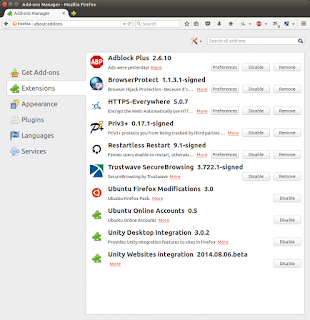

v5.0
I updated the "ubuntuprivacy" script to kill "Firefox" before proceeding to clear your browser history.
#!/bin/sh
echo "\033[0;34mProceeding to clean your system to ensure your privacy.\033[0m"
echo
echo "\033[0;31mWiping Firefox history and cache.\033[0m"
sudo killall firefox
#sudo srm -rllv .mozilla/firefox/*.default/*.sqlite
sudo srm -rllv .mozilla/firefox/*.default/addons.sqlite
sudo srm -rllv .mozilla/firefox/*.default/chromeappsstore.sqlite
#sudo srm -rllv .mozilla/firefox/*.default/content-prefs.sqlite
sudo srm -rllv .mozilla/firefox/*.default/cookies.sqlite
sudo srm -rllv .mozilla/firefox/*.default/downloads.sqlite
#sudo srm -rllv .mozilla/firefox/*.default/extensions.sqlite
sudo srm -rllv .mozilla/firefox/*.default/formhistory.sqlite
sudo srm -rllv .mozilla/firefox/*.default/permissions.sqlite
#sudo srm -rllv .mozilla/firefox/*.default/places.sqlite
sudo srm -rllv .mozilla/firefox/*.default/search.sqlite
sudo srm -rllv .mozilla/firefox/*.default/urlclassifier3.sqlite
sudo srm -rllv .mozilla/firefox/*.default/webappsstore.sqlite
sudo srm -rllv .mozilla/firefox/*.default/Cache/*
echo "\033[0;32mFirefox history and cache wiped.\033[0m"
echo "\033[0;31mWiping Trash.\033[0m"
sudo srm -rllv .local/share/Trash/
echo "\033[0;32mTrash wiped.\033[0m"
echo "\033[0;31mWiping Applications history and cache.\033[0m"
sudo srm -rllv .recently-used
sudo srm -rllv .recently-used.xbel
sudo srm -rllv .thumbnails
sudo srm -rllv .macromedia/Flash_Player/#SharedObjects/*
#sudo srm -rllv .openoffice.org/*/user/temp
#sudo srm -rllv .openoffice.org/*/user/backup
sudo srm -rllv .libreoffice/*/user/temp/*
sudo srm -rllv .libreoffice/*/user/backup/*
sudo srm -rllv .purple/logs/*/*
sudo srm -rllv .xsession-errors
sudo srm -rllv .gimp-*/tmp
echo "\033[0;32mApplications history wiped.\033[0m"
#"ubuntuprivacy" written by commandrine.
#Please send comments and queries to commandrine[at]gmail[dot]com.
#Version 5.0 dated 31st March 2013.
#Pre-requisite is having "secure-delete" installed. Install it using "sudo apt-get install secure-delete".
#Save this script to your home folder. Run "sudo chmod +x ubuntuprivacy.sh" to make it executable.
#!/bin/sh
echo "\033[0;34mProceeding to clean your system to ensure your privacy.\033[0m"
echo
echo "\033[0;31mWiping Firefox history and cache.\033[0m"
sudo killall firefox
#sudo srm -rllv .mozilla/firefox/*.default/*.sqlite
sudo srm -rllv .mozilla/firefox/*.default/addons.sqlite
sudo srm -rllv .mozilla/firefox/*.default/chromeappsstore.sqlite
#sudo srm -rllv .mozilla/firefox/*.default/content-prefs.sqlite
sudo srm -rllv .mozilla/firefox/*.default/cookies.sqlite
sudo srm -rllv .mozilla/firefox/*.default/downloads.sqlite
#sudo srm -rllv .mozilla/firefox/*.default/extensions.sqlite
sudo srm -rllv .mozilla/firefox/*.default/formhistory.sqlite
sudo srm -rllv .mozilla/firefox/*.default/permissions.sqlite
#sudo srm -rllv .mozilla/firefox/*.default/places.sqlite
sudo srm -rllv .mozilla/firefox/*.default/search.sqlite
sudo srm -rllv .mozilla/firefox/*.default/urlclassifier3.sqlite
sudo srm -rllv .mozilla/firefox/*.default/webappsstore.sqlite
sudo srm -rllv .mozilla/firefox/*.default/Cache/*
echo "\033[0;32mFirefox history and cache wiped.\033[0m"
echo "\033[0;31mWiping Trash.\033[0m"
sudo srm -rllv .local/share/Trash/
echo "\033[0;32mTrash wiped.\033[0m"
echo "\033[0;31mWiping Applications history and cache.\033[0m"
sudo srm -rllv .recently-used
sudo srm -rllv .recently-used.xbel
sudo srm -rllv .thumbnails
sudo srm -rllv .macromedia/Flash_Player/#SharedObjects/*
#sudo srm -rllv .openoffice.org/*/user/temp
#sudo srm -rllv .openoffice.org/*/user/backup
sudo srm -rllv .libreoffice/*/user/temp/*
sudo srm -rllv .libreoffice/*/user/backup/*
sudo srm -rllv .purple/logs/*/*
sudo srm -rllv .xsession-errors
sudo srm -rllv .gimp-*/tmp
echo "\033[0;32mApplications history wiped.\033[0m"
#"ubuntuprivacy" written by commandrine.
#Please send comments and queries to commandrine[at]gmail[dot]com.
#Version 5.0 dated 31st March 2013.
#Pre-requisite is having "secure-delete" installed. Install it using "sudo apt-get install secure-delete".
#Save this script to your home folder. Run "sudo chmod +x ubuntuprivacy.sh" to make it executable.
Browser security
I was asked by a friend to recommend a list of tools to protect his browser and secure his surfing experience.
A picture speaks a thousand words.
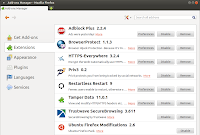
A picture speaks a thousand words.

Insecure passwords
Was in the middle of a "Penetration Testing" exercise and came across an application that sends the users' credentials in cleartext. I was surprised as I rarely encounter this scenario.
This got me thinking if popular apps such as "Facebook" and "Gmail" send our credentials in cleartext too? Fired up "Paros" and the rest they say is history.


This got me thinking if popular apps such as "Facebook" and "Gmail" send our credentials in cleartext too? Fired up "Paros" and the rest they say is history.
"SecureBrowsing"
My latest column explores the "Firefox" addon called "SecureBrowsing". Here is the excerpt.
"The Internet is a dangerous place to venture because it is rife with websites hosting malware and malicious code deployed o compromise your systems. How do you thwart hackers from fulfilling their insidious objectives?"
"The Internet is a dangerous place to venture because it is rife with websites hosting malware and malicious code deployed o compromise your systems. How do you thwart hackers from fulfilling their insidious objectives?"
"Tamper Data"
My latest column explores the "Firefox" addon called "Tamper Data". Here is the excerpt.
"HTTP Proxies are a necessary tool in the arsenal of a penetration tester. Common HTTP Proxies harnessed for testing web applications for vulnerabilities include Paros, Burp and Webscarab. My personal favourite is Paros, which is written in Java and thus, platform independent. However, I recently discovered a comparable tool called Tamper Data."
"HTTP Proxies are a necessary tool in the arsenal of a penetration tester. Common HTTP Proxies harnessed for testing web applications for vulnerabilities include Paros, Burp and Webscarab. My personal favourite is Paros, which is written in Java and thus, platform independent. However, I recently discovered a comparable tool called Tamper Data."
"jhead"
My latest column explores a tool called "jhead". Here is the excerpt.
"Smartphones are feature packed and owned by nearly everyone in developed countries. We cannot get by with our daily lifes without them. They provide us with a pocket sized gadget to surf the World Wide Web, direct us to where we want to go via the built-in Global Positioning System (GPS)and even permit us to take videos as well as photographs on the go. The caveat of this device is that it records a lot of sensitive data about its owner by default."
"Smartphones are feature packed and owned by nearly everyone in developed countries. We cannot get by with our daily lifes without them. They provide us with a pocket sized gadget to surf the World Wide Web, direct us to where we want to go via the built-in Global Positioning System (GPS)and even permit us to take videos as well as photographs on the go. The caveat of this device is that it records a lot of sensitive data about its owner by default."
"WebHTTrack"
My latest column on the "Linux" version of "HTTrack". Here is the excerpt.
"HTTrack Website Copier is aopen source tool to download an entire website from the Internet locally onto your desktop for offline browsing. It is a Windowssoftware that spawned WebHTTrack, its Linux/Unix/BSDrelease. The tool dumps and mirrors the complete contents of the source website you specify to a local directory by replicating the exact directory structure, files and links.
This is beneficial for a security practitioner who wants to perform offline security testing against a website without impacting the server hosting it ."
The latest issue of "Hakin9" also features an article by my friend, Remus Ho.
"HTTrack Website Copier is aopen source tool to download an entire website from the Internet locally onto your desktop for offline browsing. It is a Windowssoftware that spawned WebHTTrack, its Linux/Unix/BSDrelease. The tool dumps and mirrors the complete contents of the source website you specify to a local directory by replicating the exact directory structure, files and links.
This is beneficial for a security practitioner who wants to perform offline security testing against a website without impacting the server hosting it ."
The latest issue of "Hakin9" also features an article by my friend, Remus Ho.
"Windows Update" compromised
A lot of news recently about "Flame" and one method that the malware used to spread itself was via "Windows Update". Fascinating read.
Subscribe to:
Posts (Atom)
-
This annoying message popped up after I ran the update in avast! in Ubuntu yesterday. avast! crashes every time I attempt to launch it after...
-
 I decided to install a digital certificate for my Gmail account. This is simple and free to set up. Apply for a free certificate from Comod...