I upgraded "Firefox" to v8 and realised that it was sluggish due to configs being wiped by v3.0 of my "ubuntuprivacy" script. I modified the script as follows.
#!/bin/sh
echo "\033[0;34mProceeding to clean your system to ensure your privacy.\033[0m"
echo
echo "\033[0;31mWiping Firefox history and cache.\033[0m"
#sudo srm -rllv .mozilla/firefox/*.default/*.sqlite
sudo srm -rllv .mozilla/firefox/*.default/addons.sqlite
sudo srm -rllv .mozilla/firefox/*.default/chromeappsstore.sqlite
#sudo srm -rllv .mozilla/firefox/*.default/content-prefs.sqlite
sudo srm -rllv .mozilla/firefox/*.default/cookies.sqlite
sudo srm -rllv .mozilla/firefox/*.default/downloads.sqlite
#sudo srm -rllv .mozilla/firefox/*.default/extensions.sqlite
sudo srm -rllv .mozilla/firefox/*.default/formhistory.sqlite
sudo srm -rllv .mozilla/firefox/*.default/permissions.sqlite
#sudo srm -rllv .mozilla/firefox/*.default/places.sqlite
sudo srm -rllv .mozilla/firefox/*.default/search.sqlite
sudo srm -rllv .mozilla/firefox/*.default/urlclassifier3.sqlite
sudo srm -rllv .mozilla/firefox/*.default/webappsstore.sqlite
sudo srm -rllv .mozilla/firefox/*.default/Cache/*
echo "\033[0;32mFirefox history and cache wiped.\033[0m"
echo "\033[0;31mWiping Trash.\033[0m"
sudo srm -rllv .local/share/Trash/
echo "\033[0;32mTrash wiped.\033[0m"
echo "\033[0;31mWiping Applications history and cache.\033[0m"
sudo srm -rllv .recently-used
sudo srm -rllv .recently-used.xbel
sudo srm -rllv .thumbnails
sudo srm -rllv .macromedia/Flash_Player/#SharedObjects/*
#sudo srm -rllv .openoffice.org/*/user/temp
#sudo srm -rllv .openoffice.org/*/user/backup
sudo srm -rllv .libreoffice/*/user/temp/*
sudo srm -rllv .libreoffice/*/user/backup/*
sudo srm -rllv .purple/logs/*/*
sudo srm -rllv .xsession-errors
sudo srm -rllv .gimp-*/tmp
echo "\033[0;32mApplications history wiped.\033[0m"
#"ubuntuprivacy" written by commandrine.
#Please send comments and queries to commandrine[at]gmail[dot]com.
#Version 4.0 dated 9th Nov 2011.
#Pre-requisite is having "secure-delete" installed. Install it using "sudo apt-get install secure-delete".
#Save this script to your home folder. Run "sudo chmod +x ubuntuprivacy.sh" to make it executable.
You can also download the script from here.

"HTTPS Everywhere"
Finished this column months ahead of schedule and it was finally published in this month's issue of "Hakin9".
An excerpt of it below.
"HTTPS Everywhere is a Firefox extension that was developed and is maintained by the Electronic Frontier Foundation (EFF). It was first released in June 2010 and is not available from Mozilla but can be downloaded from EFF’s site (https://www.eff.org/files/https-everywhere-latest.xpi)."
I should really get started on my next column draft.
An excerpt of it below.
"HTTPS Everywhere is a Firefox extension that was developed and is maintained by the Electronic Frontier Foundation (EFF). It was first released in June 2010 and is not available from Mozilla but can be downloaded from EFF’s site (https://www.eff.org/files/https-everywhere-latest.xpi)."
I should really get started on my next column draft.
"Prey: From Praying to Preying"
My new column is out in Hakin9 magazine. It was 2 months overdue so it is a relief that it is finally published.
An excerpt of it in the "Tool Time" column this month.
"Since the issue 7/2010 article Prey: A new hope, there have been developments in the device tracking tool. It has been enhanced to now be able to monitor lost Android smartphones and tablets when activated. There was a reported case in May 2011 where a Californian harnessed evidence collected from a similar tool, Hidden, to recover his stolen Macbook."
An excerpt of it in the "Tool Time" column this month.
"Since the issue 7/2010 article Prey: A new hope, there have been developments in the device tracking tool. It has been enhanced to now be able to monitor lost Android smartphones and tablets when activated. There was a reported case in May 2011 where a Californian harnessed evidence collected from a similar tool, Hidden, to recover his stolen Macbook."
nessusjob
Was lazy to memorise the Nessus commands to start/stop the service as well as update its plugins so I decided to dump them into the following script.
#!/bin/sh
echo "\033[0;34mPrepping Nessus for scanning.\033[0m"
sudo /etc/init.d/nessusd stop
echo "\033[0;31mUpdating Nessus plugins.\033[0m"
sudo /opt/nessus/sbin/nessus-update-plugins
echo "\033[0;31mStart Nessus service.\033[0m"
sudo /etc/init.d/nessusd start
echo "\033[0;31mAccess Nessus console on https://127.0.0.1:8834.\033[0m"
#"nessusjob" written by commandrine.
#Please send comments and queries to commandrine[at]gmail[dot]com.
#Version 1.0 dated 23rd September 2011.
#Pre-requisite is having "Nessus" installed, registered license key configured and the Nessus user created.
#Save this script to your home folder. Run "sudo chmod +x nessusjob.sh" to make it executable.
Download it here.
#!/bin/sh
echo "\033[0;34mPrepping Nessus for scanning.\033[0m"
sudo /etc/init.d/nessusd stop
echo "\033[0;31mUpdating Nessus plugins.\033[0m"
sudo /opt/nessus/sbin/nessus-update-plugins
echo "\033[0;31mStart Nessus service.\033[0m"
sudo /etc/init.d/nessusd start
echo "\033[0;31mAccess Nessus console on https://127.0.0.1:8834.\033[0m"
#"nessusjob" written by commandrine.
#Please send comments and queries to commandrine[at]gmail[dot]com.
#Version 1.0 dated 23rd September 2011.
#Pre-requisite is having "Nessus" installed, registered license key configured and the Nessus user created.
#Save this script to your home folder. Run "sudo chmod +x nessusjob.sh" to make it executable.
Download it here.
My first column
Hakin9 asked me to be a bimonthly contributor to their new column entitled "Tool Time" and here is an excerpt of it.
"Hispasec Sistemas has managed the service, VirusTotal, since 1st June 2004. The website (http://www.virustotal.com) offers the public access to multiple Antivirus (AV) engines hosted by them to provision online scanning of individual files to uncover malware by harnessing a combination of signature-based and heuristic detection."
"Hispasec Sistemas has managed the service, VirusTotal, since 1st June 2004. The website (http://www.virustotal.com) offers the public access to multiple Antivirus (AV) engines hosted by them to provision online scanning of individual files to uncover malware by harnessing a combination of signature-based and heuristic detection."
v3.0
I updated "ubuntuprivacy.sh" to comment out wiping of OpenOffice history and include wiping of LibreOffice history.
#!/bin/sh
echo "\033[0;34mProceeding to clean your system to ensure your privacy.\033[0m"
echo
echo "\033[0;31mWiping Firefox history and cache.\033[0m"
#sudo srm -rllv .mozilla/firefox/*.default/*.sqlite
sudo srm -rllv .mozilla/firefox/*.default/addons.sqlite
sudo srm -rllv .mozilla/firefox/*.default/chromeappsstore.sqlite
#sudo srm -rllv .mozilla/firefox/*.default/content-prefs.sqlite
sudo srm -rllv .mozilla/firefox/*.default/cookies.sqlite
sudo srm -rllv .mozilla/firefox/*.default/downloads.sqlite
sudo srm -rllv .mozilla/firefox/*.default/extensions.sqlite
sudo srm -rllv .mozilla/firefox/*.default/formhistory.sqlite
sudo srm -rllv .mozilla/firefox/*.default/permissions.sqlite
#sudo srm -rllv .mozilla/firefox/*.default/places.sqlite
sudo srm -rllv .mozilla/firefox/*.default/search.sqlite
sudo srm -rllv .mozilla/firefox/*.default/urlclassifier3.sqlite
sudo srm -rllv .mozilla/firefox/*.default/webappsstore.sqlite
sudo srm -rllv .mozilla/firefox/*.default/Cache/*
echo "\033[0;32mFirefox history and cache wiped.\033[0m"
echo "\033[0;31mWiping Trash.\033[0m"
sudo srm -rllv .local/share/Trash/
echo "\033[0;32mTrash wiped.\033[0m"
echo "\033[0;31mWiping Applications history and cache.\033[0m"
sudo srm -rllv .recently-used
sudo srm -rllv .recently-used.xbel
sudo srm -rllv .thumbnails
sudo srm -rllv .macromedia/Flash_Player/#SharedObjects/*
#sudo srm -rllv .openoffice.org/*/user/temp
#sudo srm -rllv .openoffice.org/*/user/backup
sudo srm -rllv .libreoffice/*/user/temp/*
sudo srm -rllv .libreoffice/*/user/backup/*
sudo srm -rllv .purple/logs/*/*
sudo srm -rllv .xsession-errors
sudo srm -rllv .gimp-*/tmp
echo "\033[0;32mApplications history wiped.\033[0m"
#"ubuntuprivacy" written by commandrine.
#Please send comments and queries to commandrine[at]gmail[dot]com.
#Version 3.0 dated 22th July 2011.
#Pre-requisite is having "secure-delete" installed. Install it using "sudo apt-get install secure-delete".
#Save this script to your home folder. Run "sudo chmod +x ubuntuprivacy.sh" to make it executable.
The wiping of Flash cookies (which I blogged about previously) is also appended into this version.
#!/bin/sh
echo "\033[0;34mProceeding to clean your system to ensure your privacy.\033[0m"
echo
echo "\033[0;31mWiping Firefox history and cache.\033[0m"
#sudo srm -rllv .mozilla/firefox/*.default/*.sqlite
sudo srm -rllv .mozilla/firefox/*.default/addons.sqlite
sudo srm -rllv .mozilla/firefox/*.default/chromeappsstore.sqlite
#sudo srm -rllv .mozilla/firefox/*.default/content-prefs.sqlite
sudo srm -rllv .mozilla/firefox/*.default/cookies.sqlite
sudo srm -rllv .mozilla/firefox/*.default/downloads.sqlite
sudo srm -rllv .mozilla/firefox/*.default/extensions.sqlite
sudo srm -rllv .mozilla/firefox/*.default/formhistory.sqlite
sudo srm -rllv .mozilla/firefox/*.default/permissions.sqlite
#sudo srm -rllv .mozilla/firefox/*.default/places.sqlite
sudo srm -rllv .mozilla/firefox/*.default/search.sqlite
sudo srm -rllv .mozilla/firefox/*.default/urlclassifier3.sqlite
sudo srm -rllv .mozilla/firefox/*.default/webappsstore.sqlite
sudo srm -rllv .mozilla/firefox/*.default/Cache/*
echo "\033[0;32mFirefox history and cache wiped.\033[0m"
echo "\033[0;31mWiping Trash.\033[0m"
sudo srm -rllv .local/share/Trash/
echo "\033[0;32mTrash wiped.\033[0m"
echo "\033[0;31mWiping Applications history and cache.\033[0m"
sudo srm -rllv .recently-used
sudo srm -rllv .recently-used.xbel
sudo srm -rllv .thumbnails
sudo srm -rllv .macromedia/Flash_Player/#SharedObjects/*
#sudo srm -rllv .openoffice.org/*/user/temp
#sudo srm -rllv .openoffice.org/*/user/backup
sudo srm -rllv .libreoffice/*/user/temp/*
sudo srm -rllv .libreoffice/*/user/backup/*
sudo srm -rllv .purple/logs/*/*
sudo srm -rllv .xsession-errors
sudo srm -rllv .gimp-*/tmp
echo "\033[0;32mApplications history wiped.\033[0m"
#"ubuntuprivacy" written by commandrine.
#Please send comments and queries to commandrine[at]gmail[dot]com.
#Version 3.0 dated 22th July 2011.
#Pre-requisite is having "secure-delete" installed. Install it using "sudo apt-get install secure-delete".
#Save this script to your home folder. Run "sudo chmod +x ubuntuprivacy.sh" to make it executable.
The wiping of Flash cookies (which I blogged about previously) is also appended into this version.
Ubuntu update error
When I ran "sudo-apt update" command in Terminal, I get the following error.
commandrine@bridge:~$ sudo apt-get update
[sudo] password for commandrine:
Hit http://sg.archive.ubuntu.com lucid Release.gpg
Ign http://sg.archive.ubuntu.com/ubuntu/ lucid/main Translation-en_SG
Ign http://sg.archive.ubuntu.com/ubuntu/ lucid/restricted Translation-en_SG
Ign http://sg.archive.ubuntu.com/ubuntu/ lucid/universe Translation-en_SG
Ign http://sg.archive.ubuntu.com/ubuntu/ lucid/multiverse Translation-en_SG
Hit http://sg.archive.ubuntu.com lucid-updates Release.gpg
Ign http://sg.archive.ubuntu.com/ubuntu/ lucid-updates/main Translation-en_SG
Ign http://sg.archive.ubuntu.com/ubuntu/ lucid-updates/restricted Translation-en_SG
Ign http://sg.archive.ubuntu.com/ubuntu/ lucid-updates/universe Translation-en_SG
Ign http://sg.archive.ubuntu.com/ubuntu/ lucid-updates/multiverse Translation-en_SG
Hit http://sg.archive.ubuntu.com lucid Release
Hit http://sg.archive.ubuntu.com lucid-updates Release
Hit http://sg.archive.ubuntu.com lucid/main Packages
Hit http://sg.archive.ubuntu.com lucid/restricted Packages
Hit http://sg.archive.ubuntu.com lucid/main Sources
Hit http://sg.archive.ubuntu.com lucid/restricted Sources
Hit http://sg.archive.ubuntu.com lucid/universe Packages
Hit http://sg.archive.ubuntu.com lucid/universe Sources
Hit http://sg.archive.ubuntu.com lucid/multiverse Packages
Hit http://sg.archive.ubuntu.com lucid/multiverse Sources
Hit http://sg.archive.ubuntu.com lucid-updates/main Packages
Hit http://sg.archive.ubuntu.com lucid-updates/restricted Packages
Hit http://sg.archive.ubuntu.com lucid-updates/main Sources
Hit http://sg.archive.ubuntu.com lucid-updates/restricted Sources
Hit http://sg.archive.ubuntu.com lucid-updates/universe Packages
Hit http://sg.archive.ubuntu.com lucid-updates/universe Sources
Hit http://sg.archive.ubuntu.com lucid-updates/multiverse Packages
Hit http://sg.archive.ubuntu.com lucid-updates/multiverse Sources
Hit http://ppa.launchpad.net lucid Release.gpg
Hit http://security.ubuntu.com lucid-security Release.gpg
Ign http://ppa.launchpad.net/docky-core/ppa/ubuntu/ lucid/main Translation-en_SG
Ign http://security.ubuntu.com/ubuntu/ lucid-security/main Translation-en_SG
Hit http://ppa.launchpad.net lucid Release.gpg
Ign http://security.ubuntu.com/ubuntu/ lucid-security/restricted Translation-en_SG
Ign http://ppa.launchpad.net/docky-core/stable/ubuntu/ lucid/main Translation-en_SG
Ign http://security.ubuntu.com/ubuntu/ lucid-security/universe Translation-en_SG
Get:1 http://ppa.launchpad.net lucid Release.gpg [316B]
Ign http://ppa.launchpad.net/moonlight-team/pinta/ubuntu/ lucid/main Translation-en_SG
Ign http://security.ubuntu.com/ubuntu/ lucid-security/multiverse Translation-en_SG
Get:2 http://ppa.launchpad.net lucid Release.gpg [316B]
Get:3 http://security.ubuntu.com lucid-security Release [44.7kB]
Ign http://ppa.launchpad.net/mozillateam/firefox-stable/ubuntu/ lucid/main Translation-en_SG
Hit http://ppa.launchpad.net lucid Release.gpg
Ign http://ppa.launchpad.net/pidgin-developers/ppa/ubuntu/ lucid/main Translation-en_SG
Hit http://security.ubuntu.com lucid-security/main Packages
Get:4 http://ppa.launchpad.net lucid Release.gpg [316B]
Ign http://ppa.launchpad.net/ubuntu-mozilla-security/ppa/ubuntu/ lucid/main Translation-en_SG
Hit http://security.ubuntu.com lucid-security/restricted Packages
Hit http://ppa.launchpad.net lucid Release
Hit http://security.ubuntu.com lucid-security/main Sources
Get:5 http://security.ubuntu.com lucid-security/restricted Sources [14B]
Hit http://ppa.launchpad.net lucid Release
Hit http://security.ubuntu.com lucid-security/universe Packages
Get:6 http://ppa.launchpad.net lucid Release [57.3kB]
Ign http://ppa.launchpad.net lucid Release
Get:7 http://ppa.launchpad.net lucid Release [14.0kB]
Ign http://ppa.launchpad.net lucid Release
Hit http://security.ubuntu.com lucid-security/universe Sources
Get:8 http://ppa.launchpad.net lucid Release [14.0kB]
Hit http://security.ubuntu.com lucid-security/multiverse Packages
Hit http://security.ubuntu.com lucid-security/multiverse Sources
Get:9 http://ppa.launchpad.net lucid Release [14.0kB]
Ign http://ppa.launchpad.net lucid Release
Hit http://ppa.launchpad.net lucid/main Packages
Get:10 http://ppa.launchpad.net lucid/main Packages [1,506B]
Get:11 http://ppa.launchpad.net lucid/main Packages [752B]
Hit http://ppa.launchpad.net lucid/main Packages
Hit http://ppa.launchpad.net lucid/main Packages
Ign http://ppa.launchpad.net lucid/main Sources
Hit http://ppa.launchpad.net lucid/main Packages
Ign http://ppa.launchpad.net lucid/main Sources
Err http://ppa.launchpad.net lucid/main Sources
416 Requested Range Not Satisfiable 20003
Fetched 61.8kB in 22s (2,794B/s)
W: GPG error: http://ppa.launchpad.net lucid Release: The following signatures couldn't be verified because the public key is not available: NO_PUBKEY 3AD52A40B98E84D3
W: GPG error: http://ppa.launchpad.net lucid Release: The following signatures couldn't be verified because the public key is not available: NO_PUBKEY 9BDB3D89CE49EC21
W: GPG error: http://ppa.launchpad.net lucid Release: The following signatures couldn't be verified because the public key is not available: NO_PUBKEY A6DCF7707EBC211F
W: Failed to fetch http://ppa.launchpad.net/pidgin-developers/ppa/ubuntu/dists/lucid/main/source/Sources.gz 416 Requested Range Not Satisfiable 20003
E: Some index files failed to download, they have been ignored, or old ones used instead.
Turning to the Ubuntu Forum, I get advise on running the following commands to rectify the missing keys issue.
gpg --keyserver keyserver.ubuntu.com --recv 3AD52A40B98E84D3
gpg --export --armor 3AD52A40B98E84D3 | sudo apt-key add -
gpg --keyserver keyserver.ubuntu.com --recv 9BDB3D89CE49EC21
gpg --export --armor 9BDB3D89CE49EC21 | sudo apt-key add -
gpg --keyserver keyserver.ubuntu.com --recv A6DCF7707EBC211F
gpg --export --armor A6DCF7707EBC211F | sudo apt-key add -
I encountered 2 keys that still generate update errors. Heading back to the Forum, I get the following steps to rectify the issue.
sudo -i
apt-get clean
cd /var/lib/apt
mv lists lists.old
mkdir -p lists/partial
apt-get clean
apt-get update
Problem solved.
commandrine@bridge:~$ sudo apt-get update
[sudo] password for commandrine:
Hit http://sg.archive.ubuntu.com lucid Release.gpg
Ign http://sg.archive.ubuntu.com/ubuntu/ lucid/main Translation-en_SG
Ign http://sg.archive.ubuntu.com/ubuntu/ lucid/restricted Translation-en_SG
Ign http://sg.archive.ubuntu.com/ubuntu/ lucid/universe Translation-en_SG
Ign http://sg.archive.ubuntu.com/ubuntu/ lucid/multiverse Translation-en_SG
Hit http://sg.archive.ubuntu.com lucid-updates Release.gpg
Ign http://sg.archive.ubuntu.com/ubuntu/ lucid-updates/main Translation-en_SG
Ign http://sg.archive.ubuntu.com/ubuntu/ lucid-updates/restricted Translation-en_SG
Ign http://sg.archive.ubuntu.com/ubuntu/ lucid-updates/universe Translation-en_SG
Ign http://sg.archive.ubuntu.com/ubuntu/ lucid-updates/multiverse Translation-en_SG
Hit http://sg.archive.ubuntu.com lucid Release
Hit http://sg.archive.ubuntu.com lucid-updates Release
Hit http://sg.archive.ubuntu.com lucid/main Packages
Hit http://sg.archive.ubuntu.com lucid/restricted Packages
Hit http://sg.archive.ubuntu.com lucid/main Sources
Hit http://sg.archive.ubuntu.com lucid/restricted Sources
Hit http://sg.archive.ubuntu.com lucid/universe Packages
Hit http://sg.archive.ubuntu.com lucid/universe Sources
Hit http://sg.archive.ubuntu.com lucid/multiverse Packages
Hit http://sg.archive.ubuntu.com lucid/multiverse Sources
Hit http://sg.archive.ubuntu.com lucid-updates/main Packages
Hit http://sg.archive.ubuntu.com lucid-updates/restricted Packages
Hit http://sg.archive.ubuntu.com lucid-updates/main Sources
Hit http://sg.archive.ubuntu.com lucid-updates/restricted Sources
Hit http://sg.archive.ubuntu.com lucid-updates/universe Packages
Hit http://sg.archive.ubuntu.com lucid-updates/universe Sources
Hit http://sg.archive.ubuntu.com lucid-updates/multiverse Packages
Hit http://sg.archive.ubuntu.com lucid-updates/multiverse Sources
Hit http://ppa.launchpad.net lucid Release.gpg
Hit http://security.ubuntu.com lucid-security Release.gpg
Ign http://ppa.launchpad.net/docky-core/ppa/ubuntu/ lucid/main Translation-en_SG
Ign http://security.ubuntu.com/ubuntu/ lucid-security/main Translation-en_SG
Hit http://ppa.launchpad.net lucid Release.gpg
Ign http://security.ubuntu.com/ubuntu/ lucid-security/restricted Translation-en_SG
Ign http://ppa.launchpad.net/docky-core/stable/ubuntu/ lucid/main Translation-en_SG
Ign http://security.ubuntu.com/ubuntu/ lucid-security/universe Translation-en_SG
Get:1 http://ppa.launchpad.net lucid Release.gpg [316B]
Ign http://ppa.launchpad.net/moonlight-team/pinta/ubuntu/ lucid/main Translation-en_SG
Ign http://security.ubuntu.com/ubuntu/ lucid-security/multiverse Translation-en_SG
Get:2 http://ppa.launchpad.net lucid Release.gpg [316B]
Get:3 http://security.ubuntu.com lucid-security Release [44.7kB]
Ign http://ppa.launchpad.net/mozillateam/firefox-stable/ubuntu/ lucid/main Translation-en_SG
Hit http://ppa.launchpad.net lucid Release.gpg
Ign http://ppa.launchpad.net/pidgin-developers/ppa/ubuntu/ lucid/main Translation-en_SG
Hit http://security.ubuntu.com lucid-security/main Packages
Get:4 http://ppa.launchpad.net lucid Release.gpg [316B]
Ign http://ppa.launchpad.net/ubuntu-mozilla-security/ppa/ubuntu/ lucid/main Translation-en_SG
Hit http://security.ubuntu.com lucid-security/restricted Packages
Hit http://ppa.launchpad.net lucid Release
Hit http://security.ubuntu.com lucid-security/main Sources
Get:5 http://security.ubuntu.com lucid-security/restricted Sources [14B]
Hit http://ppa.launchpad.net lucid Release
Hit http://security.ubuntu.com lucid-security/universe Packages
Get:6 http://ppa.launchpad.net lucid Release [57.3kB]
Ign http://ppa.launchpad.net lucid Release
Get:7 http://ppa.launchpad.net lucid Release [14.0kB]
Ign http://ppa.launchpad.net lucid Release
Hit http://security.ubuntu.com lucid-security/universe Sources
Get:8 http://ppa.launchpad.net lucid Release [14.0kB]
Hit http://security.ubuntu.com lucid-security/multiverse Packages
Hit http://security.ubuntu.com lucid-security/multiverse Sources
Get:9 http://ppa.launchpad.net lucid Release [14.0kB]
Ign http://ppa.launchpad.net lucid Release
Hit http://ppa.launchpad.net lucid/main Packages
Get:10 http://ppa.launchpad.net lucid/main Packages [1,506B]
Get:11 http://ppa.launchpad.net lucid/main Packages [752B]
Hit http://ppa.launchpad.net lucid/main Packages
Hit http://ppa.launchpad.net lucid/main Packages
Ign http://ppa.launchpad.net lucid/main Sources
Hit http://ppa.launchpad.net lucid/main Packages
Ign http://ppa.launchpad.net lucid/main Sources
Err http://ppa.launchpad.net lucid/main Sources
416 Requested Range Not Satisfiable 20003
Fetched 61.8kB in 22s (2,794B/s)
W: GPG error: http://ppa.launchpad.net lucid Release: The following signatures couldn't be verified because the public key is not available: NO_PUBKEY 3AD52A40B98E84D3
W: GPG error: http://ppa.launchpad.net lucid Release: The following signatures couldn't be verified because the public key is not available: NO_PUBKEY 9BDB3D89CE49EC21
W: GPG error: http://ppa.launchpad.net lucid Release: The following signatures couldn't be verified because the public key is not available: NO_PUBKEY A6DCF7707EBC211F
W: Failed to fetch http://ppa.launchpad.net/pidgin-developers/ppa/ubuntu/dists/lucid/main/source/Sources.gz 416 Requested Range Not Satisfiable 20003
E: Some index files failed to download, they have been ignored, or old ones used instead.
Turning to the Ubuntu Forum, I get advise on running the following commands to rectify the missing keys issue.
gpg --keyserver keyserver.ubuntu.com --recv 3AD52A40B98E84D3
gpg --export --armor 3AD52A40B98E84D3 | sudo apt-key add -
gpg --keyserver keyserver.ubuntu.com --recv 9BDB3D89CE49EC21
gpg --export --armor 9BDB3D89CE49EC21 | sudo apt-key add -
gpg --keyserver keyserver.ubuntu.com --recv A6DCF7707EBC211F
gpg --export --armor A6DCF7707EBC211F | sudo apt-key add -
I encountered 2 keys that still generate update errors. Heading back to the Forum, I get the following steps to rectify the issue.
sudo -i
apt-get clean
cd /var/lib/apt
mv lists lists.old
mkdir -p lists/partial
apt-get clean
apt-get update
Problem solved.
“aspydrv.asp;.jpg”
Was reading this article about an alleged Anonymous hacker uploading a file “aspydrv.asp;.jpg” onto servers to compromise them.
This piqued my interest. I Googled the above file and found numerous sites hosting this file. Further research educated me that using the ";.jpg" at the end of the ASP file can fool insecure IIS servers.
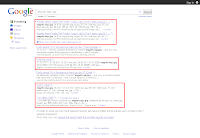

 Accessing one of the vulnerable sites, I try uploading a test ASP page written by my buddy, Simon, and the file successfully bypasses the file type check. I click on the uploaded ASP page and the "Hello World" message is published on my browser.
It is a simple trick to gain control of a vulnerable webserver but timely patching and hardening will thwart this threat.
This piqued my interest. I Googled the above file and found numerous sites hosting this file. Further research educated me that using the ";.jpg" at the end of the ASP file can fool insecure IIS servers.


It is a simple trick to gain control of a vulnerable webserver but timely patching and hardening will thwart this threat.
The seedy underworld of fake AV
Interesting research done on the fake AV industry and eye-popping statistics.
"Firestarter: Starter for your Firewall"
My new article is out this month in Hakin9 magazine. It is for paid subscribers only and here is an excerpt of it.
"The firewall is the first line of defense on the network perimeter and end points. Firewalls are susceptible to targeted attacks (eg. social engineering, application vulnerabilities) but they are still the foundation upon which access control is built upon."
"The firewall is the first line of defense on the network perimeter and end points. Firewalls are susceptible to targeted attacks (eg. social engineering, application vulnerabilities) but they are still the foundation upon which access control is built upon."
Android smarphone screen capture
I wanted to take screenshots of my Android smartphone screen for my new security article and was having a nightmare doing so. It took 3 hours of research and troubleshooting to finally achieve success.
I relied on detailed information from this article to setup the Android SDK on my Ubuntu laptop.
Watch out for my new security article in Hakin9 magazine.
I relied on detailed information from this article to setup the Android SDK on my Ubuntu laptop.
Watch out for my new security article in Hakin9 magazine.
Subscribe to:
Posts (Atom)
-
This annoying message popped up after I ran the update in avast! in Ubuntu yesterday. avast! crashes every time I attempt to launch it after...
-
 I decided to install a digital certificate for my Gmail account. This is simple and free to set up. Apply for a free certificate from Comod...