I wanted to take screenshots of my Android smartphone screen for my new security article and was having a nightmare doing so. It took 3 hours of research and troubleshooting to finally achieve success.
I relied on detailed information from this article to setup the Android SDK on my Ubuntu laptop.
Watch out for my new security article in Hakin9 magazine.

Insider threat
Friends I talk to are confident that their personal information is not important or critical but this is a scary and real example of what hackers will do with your details.
No password needed
New malware targeting Mac OS X that will not prompt users to enter their administrator password before infecting the victim's machine. Mac users and Apple can continue to be in denial but it is a reality now.
Install an AV on your Mac.
Install an AV on your Mac.
Encrypted mails
I decided to install a digital certificate for my Gmail account. This is simple and free to set up.
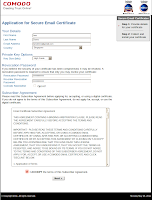

 You need to allow outbound TCP traffic on port 465 if you have a host firewall running on your system. If you want to export the installed certificate for use in other software, click on "Preferences">"Advanced">"Encryption">"View Certificates".


- Apply for a free certificate from Comodo.
- The certificate will be automatically installed to your browser when you click on the link in the email from Comodo.
- Install the "Gmail S/MIME" addon from the Firefox addon source.
- Log into Gmail and the "Encrypt" icon is visible when you compose new mails.


Graphics Engine threat
A recently added Graphics Engine, WebGL, in Firefox 4 and Chrome 9 are vulnerable to exploit.
The article provisions solutions to disabling this component in both browsers. I will quickly summarise how to disable WebGL in Firefox 4.
 Simple steps that will give you peace of mind.
The article provisions solutions to disabling this component in both browsers. I will quickly summarise how to disable WebGL in Firefox 4.
- Type in "about:config" in the address bar.
- Search for "webgl".
- Set value for "webgl.disabled" to "true".
- Restart Firefox.

"Armitage"
"Armitage" was a tool that I discovered from the cover of "Linux Journal" in "Page One" today. It shows how outdated I am with the latest fancy security tools available out there.
Visiting the website hosting the tool, I came across this demo video of the tool in action.
This video is easy to follow and comprehend. It saves me the effort of making a similar video. From the demo, the tool proves to be intuitive and logical. The learning curve is pretty gentle as it assists users through the logical flow of discovering vulnerable machines to identifying the applicable exploits that can be launched against the target in order to successfully compromise that system.
Definitely a must-have interface to enhance the capabilities of "Metasploit".
Visiting the website hosting the tool, I came across this demo video of the tool in action.
Definitely a must-have interface to enhance the capabilities of "Metasploit".
Websense Defensio
It has been almost 2 years since I last went to a Security seminar. I strongly believe that you learn when you attend an event with good content. Today was a classic example. I was enlightened about the available of a free service from "Websense" called "Defensio". It is a tool for social mediums to protect both users and their followers against threats in the form of unruly followers or hackers.
It is available as an app in "Facebook". Type "Defensio" into the search box to find it listed under "Applications". Add the app and allow it access to your profile to protect it. Access the settings section and choose your desired configurations. I tried posting an adult link to my wall and it was successfully blocked by "Defensio".
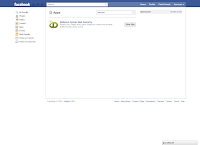


It is available as an app in "Facebook". Type "Defensio" into the search box to find it listed under "Applications". Add the app and allow it access to your profile to protect it. Access the settings section and choose your desired configurations. I tried posting an adult link to my wall and it was successfully blocked by "Defensio".


Terminal
Visited "OMG! Ubuntu!" today as I do everyday. I was presented by a terminal upon successfully accessing the site. My first instinct was that it was a mistake made by the server administrator as my request was redirected to "http://www.omgubuntu.co.uk/bash/". I typed in "help" as hinted in the terminal window. Typical Linux commands were revealed along with strange ones like "moo" and "fortune".

 The funny outputs were indicative of an April Fool's prank. The comment "Enjoyed this April fools? click a few ads!" in the page source confirmed this.
I had already caught on and proceeded to continue my fun by running "wget" and "rm *". I also read articles published on the site in text format.

 Typing "logout" brings you back to the homepage.


I had already caught on and proceeded to continue my fun by running "wget" and "rm *". I also read articles published on the site in text format.


Flash drive data purging issue
A new study discovers that employing traditional secure deletion techniques on solid state drives result in majority of data residing on those said drives being left intact. This is a security problem as most portable devices contain solid state drives due to their compact form.
Cross-platform Trojan
Subscribe to:
Posts (Atom)
-
This annoying message popped up after I ran the update in avast! in Ubuntu yesterday. avast! crashes every time I attempt to launch it after...
-
 I decided to install a digital certificate for my Gmail account. This is simple and free to set up. Apply for a free certificate from Comod...